iOS/Development
Alert, Action Sheet 간단 정리
devbi
2021. 1. 19. 09:47
반응형
안드로이드 개발에서 사용하면 알람창
아이폰에서는 아래와 같은 모습을 한다 (왼쪽 : ActionSheet, 오른쪽 : Alert)
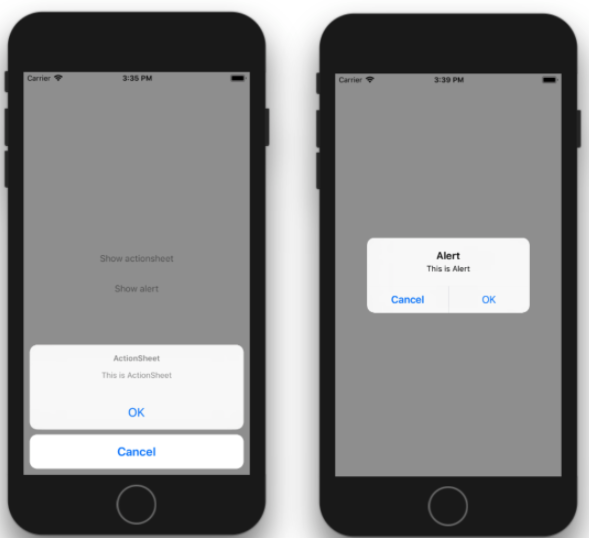
1. ActionSheet
- ActionSheet ViewController 생성후 Action을 생성하여 Present 호출 하면됨
- style 옵션에 .destructive .cancle .default 3가지 타입이있고 버튼 형태가 달라지니 기호에 맞게 사용하면된다
 let actionSheetController = UIAlertController(title: "전화번호 수집 동의", message: "파트너 인증을 위하여 휴대폰 번호를 수집 합니다", preferredStyle: .actionSheet)

// 동의 액션
let actionDefault = UIAlertAction(title: "동의", style: .default, handler: { action in
	print("ok!")
})

// 거절 액션
let actionCancle = UIAlertAction(title: "거절", style: .destructive, handler: { action in

	print("cancle!")

})

// 액션 넣어주고 호출하면 끝
actionsheetController.addAction(actionDefault)
actionsheetController.addAction(actionCancle)
self.present(actionSheetController, animated: true)
2. Alert
- Alert 도 마찬가지다
- 핸들러 만들고 바인딩후 호출하면 끝
let alertController = UIAlertController(title: "타이틀 메세지", message: "바디의 메세지 내용", preferredStyle: .alert)

// ok 핸들러
let actionDefault = UIAlertAction(title: "거절", style: .destructive, handler: { action in
  print("OK")

})

// 거절 핸들러
let actionCancle = UIAlertAction(title: "거절", style: .destructive, handler: { action in
  print("Cancle")
})

// 핸들러 바인딩후 present로 호출
alertController.addAction(actionDefault)
alertController.addAction(actionCancle2)
self.present(alertController, animated: true)
반응형